Vigie Live

Live business monitoring

Your whole company on one screen, live, without changing your software

Vigie connects to what you already use: your ERP, machines, Excel files and banks. It brings your figures together, checks them and shows them on dashboards everyone can read.

  • Read-only: nothing is changed on your side
  • Mandatory two-factor authentication
  • Servers located in France

Live example · fictional data

Sales today
48,260 €
Units produced
12,840
Trucks on the road
12
Energy produced
3,412 kWh

The situation

Your figures exist. They are scattered.

To get the full picture, someone exports, copies and pastes every week. The result comes late, and nobody is sure of the number. Your ERP produces its own indicators, but it only sees what is entered into it.

  • Salesin the ERP
  • Line outputon the shop floor
  • Hours workedin payroll
  • The budgetin an Excel workbook
  • The trucksin their own application
Vigie replaces none of your tools. It sits on top of them and gives you the view you are missing.

What Vigie brings

Six practical benefits

  1. 01

    Everything in one place

    ERP, production, transport, energy, payroll, banks, subsidiaries: all your sources on the same dashboards, including the ones your ERP knows nothing about.

  2. 02

    Live

    You see what is happening now: the output of a line, an order coming in, a truck running late. Not only what was booked last month.

  3. 03

    No IT project

    Vigie reads your data without changing anything. No migration, no double entry, no heavy training. Your teams keep their tools and their habits.

  4. 04

    Readable by everyone

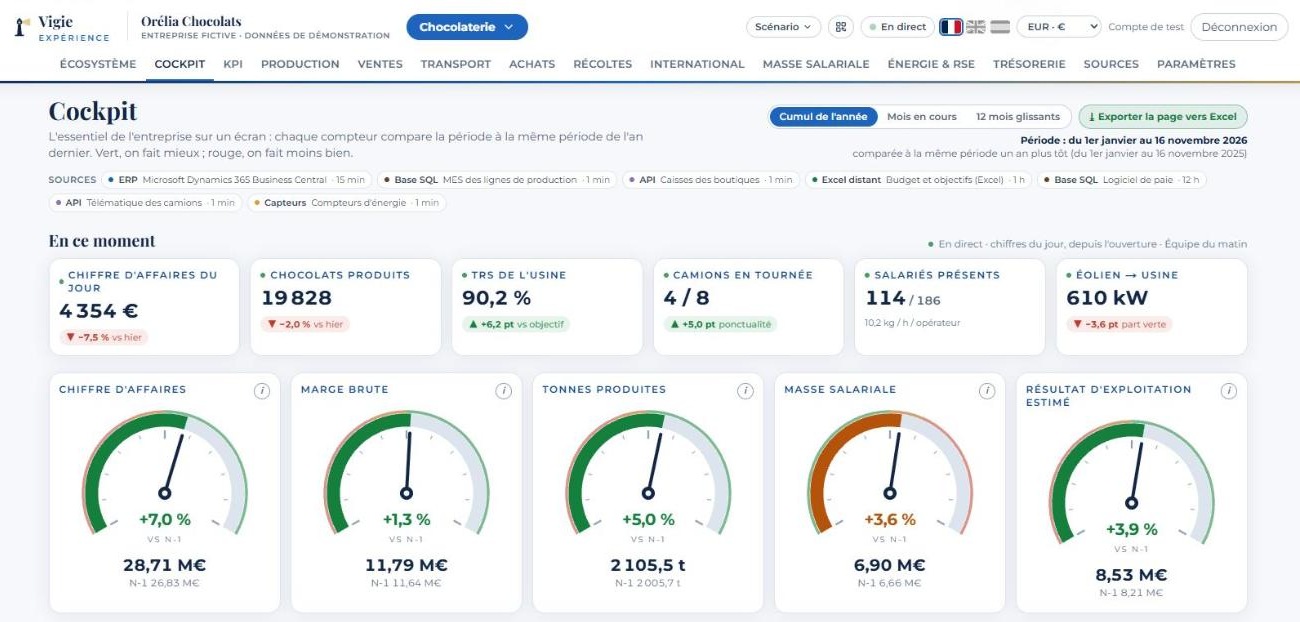
    Each indicator is compared with the same period last year: green when you are doing better, red when you are doing worse. An “i” explains where the figure comes from and how it is calculated.

  5. 05

    Built around you

    Your indicators are those of your trade, not a standard list. A chocolate maker tracks material yield, a seed producer tracks germination rate. The home screen is a picture of your company.

  6. 06

    An assistant that answers

    You ask a question in plain language and it answers from your figures: “Which branch is growing fastest?”, “What should we order first?”. The assistant is optional.

Demo space · fictional data
Vigie screenshot: the cockpit of a fictional chocolate maker, with its indicators compared with last year.
The cockpit of a fictional chocolate maker: the essentials on one screen, compared with the same period last year. Screenshot of the French interface; Vigie is also available in English and Spanish.

What sets it apart

A figure is not enough: Vigie tells you what it leads to and where it comes from

Live alerts, with the amount at stake

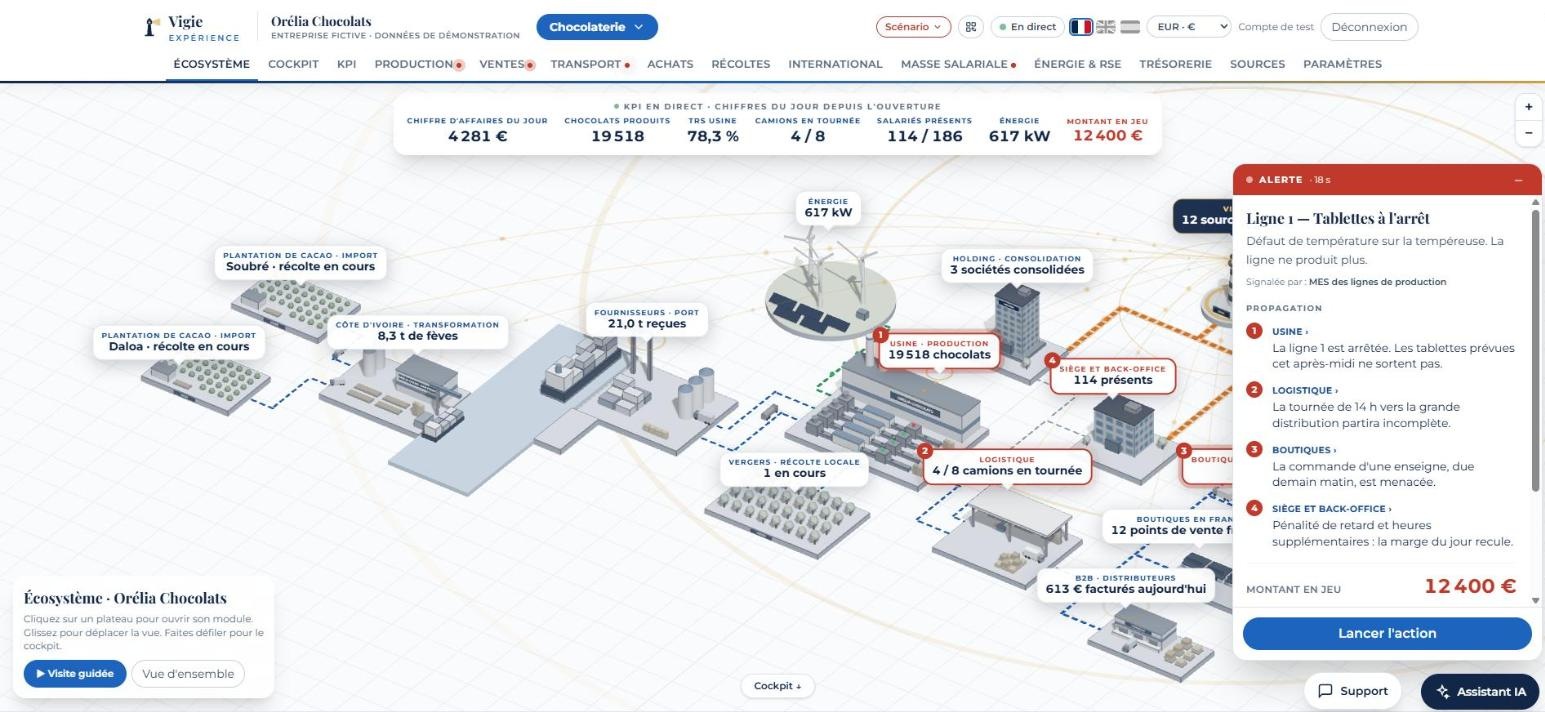
A line stops, a supplier raises a price, footfall outgrows the open checkouts: Vigie flags it at once, traces the consequences department by department, puts a figure on the amount at stake and suggests an action. You decide while there is still time, not at month-end closing.
Demo space · fictional data
Vigie screenshot: a live alert on the map of a fictional chocolate maker, with its consequences department by department and the amount at stake.
Screenshot of the French interface; Vigie is also available in English and Spanish.

“Where does this figure come from?”

Next to each indicator, a button shows its full path: the sources read, the time of the last reading, a sample of what was read and the calculation applied. No more debate about “the right number”.

Sources linked both ways

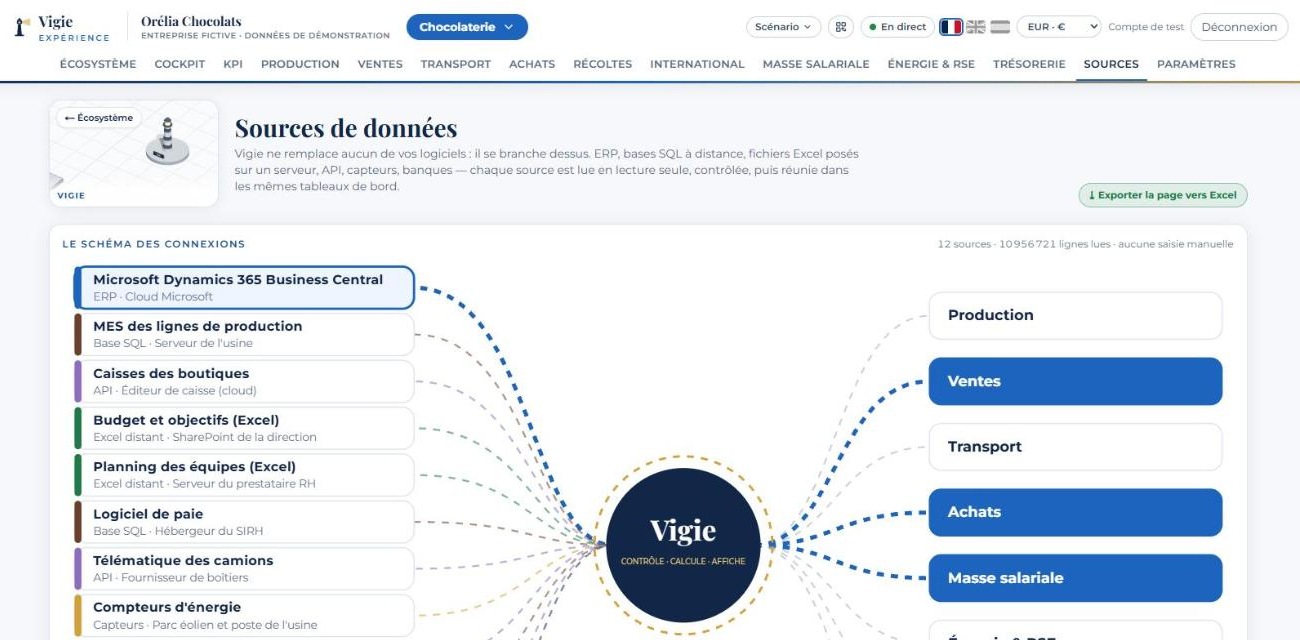
Pick a source: you see the dashboards it feeds. Pick a dashboard: you see every source that meets there, from the ERP to the Excel file.

Demo space · fictional data
Vigie screenshot: the diagram of sources linked to the dashboards.
Screenshot of the French interface; Vigie is also available in English and Spanish.

Your trade, not a template

The screens, the vocabulary and the indicators are those of your business. The home screen is a map of your company, not a generic table.

  • 15industries in the demo

    Fifteen fictional companies, each with its own map and alert scenarios.

  • 0writes to your software

    Vigie reads. It creates, changes and deletes nothing.

  • 100%of accounts use two-factor authentication

    Mandatory for every user, administrators included.

  • 3languages

    French, English and Spanish.

Industries covered

The screens of your business, not someone else's

The demo space holds fifteen fictional companies. Each has its own 3D map, its indicators and its alert scenarios.

  • Chocolate maker
  • Seed producer
  • Import
  • Car maker and dealerships
  • Construction
  • Accounting firm
  • Hypermarket
  • Private hospital
  • Transport and logistics
  • Cold-chain logistics
  • Hotel
  • Ski resort
  • Port
  • Renewable energy
  • Managed IT services
Demo space · fictional data
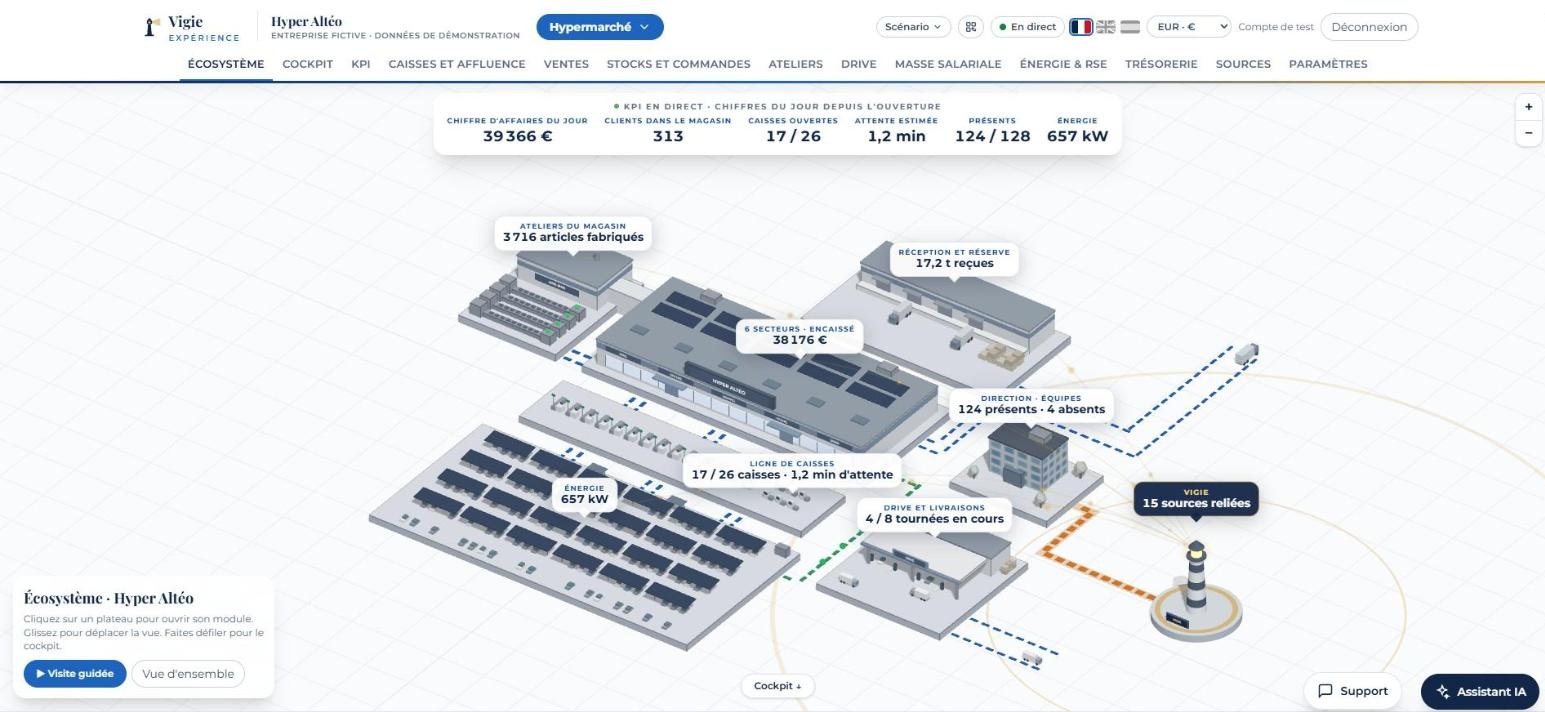
Vigie screenshot: the 3D map of a fictional hypermarket.
The map of a fictional hypermarket: every industry has its own. Screenshot of the French interface; Vigie is also available in English and Spanish.

What you see, module by module

  • Cockpit and KPIsThe essentials on one screen: revenue, margin, production, payroll cost, estimated operating profit, over the period you choose.
  • ProductionOutput of each line, overall equipment effectiveness, scrap, causes of stoppage, productivity per operator.
  • SalesRevenue by outlet, by channel and by product family, receivables and overdue invoices.
  • HarvestsOne campaign per crop: harvested to date, end-of-campaign forecast, what the plant still needs to buy.
  • PurchasingPrices paid, stock cover in days, materials to order, supplier payment schedule.
  • TransportRounds in progress, on-time rate, cost per kilometre and per delivery.
  • InternationalSites abroad, containers at sea, exports by country, each amount in its own currency and in euros.
  • PayrollStaff present, cost per department, overtime, absenteeism.
  • Energy and CSRRenewable production, consumption, green share, CO₂ emissions.
  • CashBank balances of the day, customer receivables, supplier payables.

These modules adapt to your business: the beds and operating theatres of a hospital, the fleet of a haulier, the occupancy of a hotel, the lifts of a ski area, the port calls of a harbour. Every table exports to Excel in one click, and amounts are shown in the currency you choose.

What changes

With your ERP alone, or with Vigie

NeedERP aloneWith Vigie
ScopeWhat is entered in the softwareAll your sources, machines and files included
FreshnessAfter data entry or closingTo the minute for the shop floor and sales
Several sitesOne system per site, consolidated by handA single view, currencies and time zones handled
Excel filesTo be re-entered or importedRead where they are, with nothing to change
IndicatorsThe vendor's standard reportsThose of your trade, built with you
An incidentNoticed in the next day's report or at closingFlagged at once, with consequences and amount at stake
Trust in the figureTo be cross-checked by handSource, reading time and calculation shown for every indicator
Set-upConfiguration, often by an integratorRead-only connection, nothing to migrate

See Vigie on a case close to yours

The demo runs on one of the fifteen fictional companies in our demo space. You can follow it on your phone, then ask for a trial account to explore it at your own pace.

Request a demo

Security

Your data stays under your control

Two-factor authentication is mandatory for every user: a personal password, then a one-time code on their phone.
  • Read-only

    Vigie never writes to your systems. Each connection uses a dedicated account, limited to reading, which you can switch off at any time.

  • Encrypted links

    Remote databases are read through an encrypted tunnel or a private network. Nothing is exposed on the Internet.

  • Role-based access

    Personal password, no shared account. Each person sees only what their role allows.

  • One space per customer

    Each company has its own installation, separate from the others: its containers, its network, its data and its secrets.

  • Hosted in France

    Servers located in the Paris region, with a European hosting provider. No data is stored or processed outside the European Union.

  • Personal data

    Vigie monitors a business, not people: indicators are built on totals. Payroll data stays where it is hosted.

For your CIO: the technical guarantees, point by point

What Vigie reads, where the data is hosted, who has access, and what happens in the event of an incident or at the end of the contract.

1. What Vigie does in your information system
Direction of flows
Read-only. Vigie creates, changes and deletes nothing in your software. No agent is installed on your workstations.
Account used
One dedicated service account per source, created by your teams, limited to reading and to the tables or files that are needed. You switch it off whenever you want: the source stops being read at once.
Data scope
Defined with you, source by source, before any connection. Vigie reads only what serves an indicator. The list of sources and of what is read from them can be consulted in the application.
Link
Encrypted tunnel or private network, opened from your network towards Vigie. Your databases are never exposed on the Internet and no inbound port has to be opened on your side.
Load on your servers
Spaced, scheduled readings (the frequency is set per source), with bounded queries. Your production software is not slowed down.
2. Hosting and isolation
Location
Servers located in France, in the Paris region, with a European hosting provider. No data is stored or processed outside the European Union.
One space per customer
Each customer has its own installation: its containers, its internal network, its data volume and its secrets. No database, network or key is shared between two customers.
Hardening
Read-only containers, with no system privileges, with capped memory and CPU. Only the web ports are open to the public; databases cannot be reached from the Internet.
System
Long-term-support Linux, security patches applied automatically, active firewall, automatic blocking of repeated login attempts, continuous monitoring.
Administration
Administration access by key only, with no password, restricted to the Vigie team. Secrets are kept in an encrypted vault, never in the code.
Backups
Automatic daily backup of each installation. Every update is preceded by a backup and followed by a check: if it fails, the previous version is restored automatically.
3. Encryption and access control
In transit
Everything goes over HTTPS (TLS 1.3, older versions refused), with encrypted connection enforced on the browser side (HSTS). Readings of your sources go through an encrypted tunnel.
Two-factor authentication
Mandatory for every user, administrators included, and impossible to switch off: a personal password of at least 12 characters, then a one-time code (authenticator app on a phone). Each code works only once.
Passwords
Never stored in clear text: only a hash computed by an algorithm resistant to brute-force attacks is kept. The account is locked after five failed attempts.
Sessions
Limited to twelve hours, with a signed cookie that scripts cannot read. An account that has expired or been suspended loses its session at once.
Rights
Each user sees only what their role allows. Only the designated manager creates, extends or removes an account.
Audit trail
Logins and pages viewed are recorded per account. Abnormal activity, such as automated scraping of the screens, suspends the account and alerts the administrator.
4. GDPR and personal data
Roles
Your company remains the data controller. Vigie acts as a processor, on your instructions only, under a data processing agreement compliant with Article 28 of the GDPR.
Minimisation
Indicators are built on totals: payroll cost per department, sales per outlet. Personal data that serves no indicator is not read.
Sites abroad
A table shows, country by country, the rule that applies and what Vigie reads. Payroll data stays where it is hosted: only totals are brought up.
Transfers outside the EU
None for hosting and processing. The only possible external service is the AI assistant, described below, which you can decline.
Data subjects' rights
Since Vigie holds only a read copy, a correction or erasure made in your software is reflected at the next reading. We assist you in answering requests.
Data breach
Any incident affecting your data is reported to you without delay, with what you need for your own notification to the supervisory authority.
End of contract
Your original data has never left your systems. The read copy held by Vigie and its backups are deleted, and the deletion is confirmed to you in writing.
5. AI assistant: an option, not an obligation
Activation
The assistant is switched on or off account by account. Without it, every dashboard works exactly the same.
What is sent
When it is switched on: the question asked and the aggregated figures needed to answer it. No password, no access to your sources, no original file.
Provider
The model is provided by Anthropic (Claude), through its business interface: the data sent is not used to train its models. The assistant cannot write anything, either in Vigie or in your systems.
6. What we do with your IT department before starting
Security review
We answer your questionnaire and present the architecture to your teams.
List of flows
Each source, the account used, what is read and how often: you approve the document before any connection.
Processing agreement
The data processing agreement is signed with the contract.
Reversible connection
You keep control of every read account and can cut one source, or all of them, at any time.

Getting started

From the first meeting to the first dashboard

  1. 1

    We list your sources

    ERP, shop-floor databases, files, banks: what exists and who has access to it.

  2. 2

    We choose your indicators

    The ones you already watch, and the ones you cannot get today.

  3. 3

    We connect, read-only

    Your teams carry on working as before.

  4. 4

    You check the figures

    Each indicator shows its sources, the time they were last read and its calculation, and can be exported for cross-checking.

  5. 5

    You run the business

    The dashboard updates itself. We adjust it as your business changes.

Contact

Request a demo

Tell us in a few lines what you would like to see on a single screen. We will get back to you to arrange a time.

  • A presentation on a fictional company close to your trade.
  • You can follow it on your phone by scanning a QR code.
  • Then a trial account to explore the demo space at your own pace.

Prefer to write to us directly? contact@imagin.pro